¶ Location
- In the laser room next to the CNC machine and across from the CO2 laser
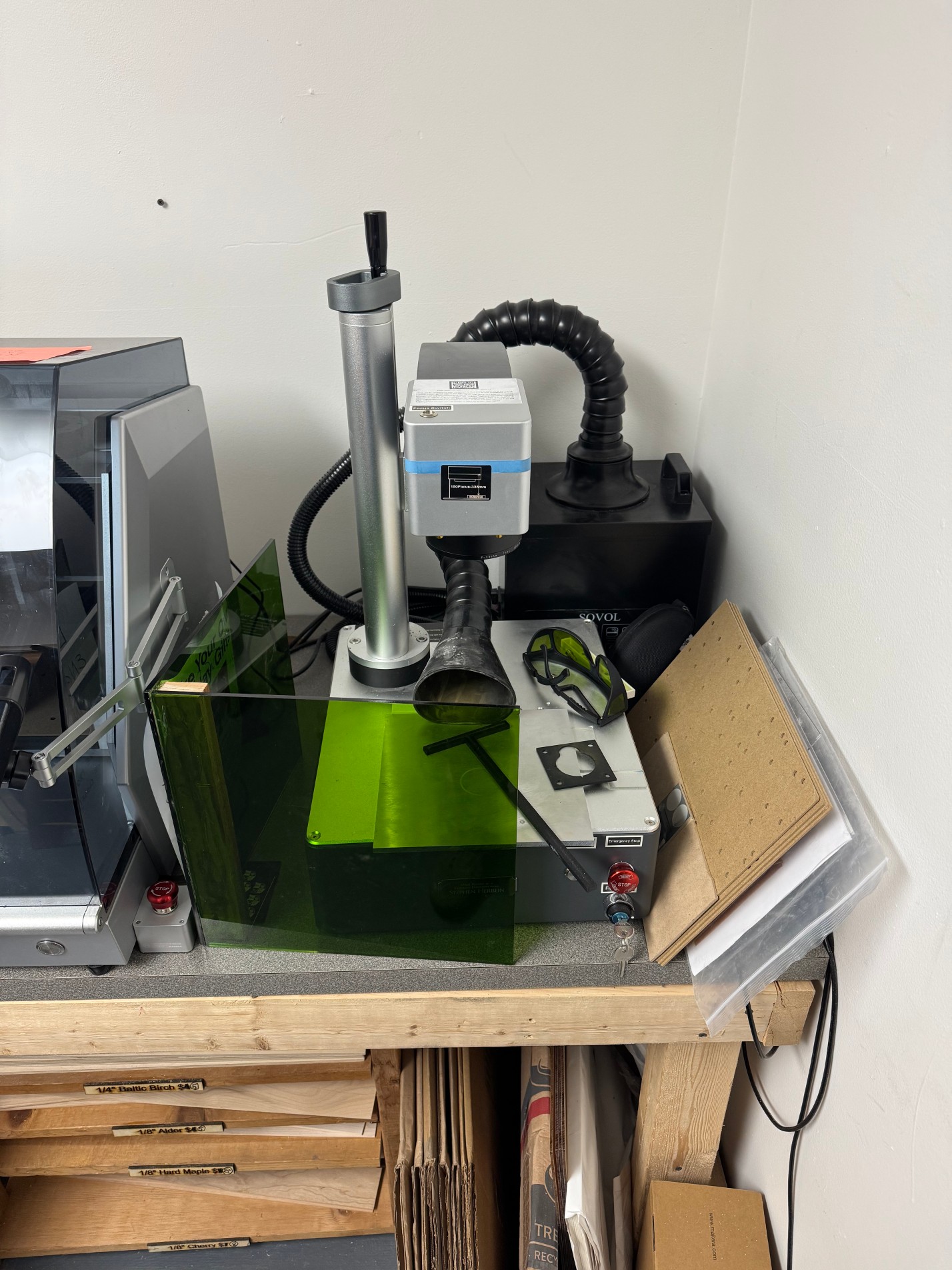
¶ Equipment Info
| Laser Type | Fiber laser — solid-state, ytterbium-doped fiber source |
| Wavelength | 1,064 nm (near-infrared — invisible to the naked eye) |
| Power | 30 W |
| Work Area | ~5.9" × 5.9" (150 × 150 mm) via galvo scanning head |
| Max Marking Speed | 10,000 mm/s |
| Spot Diameter | ~65 µm (0.065 mm) — fine precision marking |
| Accuracy | ±0.01 mm; <1% field distortion via F-theta lens |
| Laser Source Life | >100,000 hours MTTF — essentially maintenance-free |
| Cooling | Air-cooled — no water chiller required |
| Galvo System | High-speed galvanometric scanning (Sino-Galvo or equivalent) |
| Controller | Integrated control unit |
| Software | EZCad2 (bundled, Windows only) and LightBurn (compatible, Windows/Mac/Linux) |
| Connectivity | USB |
| Rotary Axis | Rotary axis included — for engraving rings, cylinders, curved surfaces |
| Red Dot Pointer | Dual red dot locators for positioning and focus alignment before firing |
| Bed Style | Open workbed — no enclosure around the marking area |
¶ What Is a Fiber Laser Good For?
The fiber laser excels at permanently marking and engraving metals and certain plastics. It is the right tool when you need:
- Serial numbers, part IDs, or barcodes on metal parts
- Deep engraving into stainless steel, aluminum, brass, copper, titanium
- Color marking on stainless steel or titanium (requires specific speed/power/frequency settings)
- High-contrast black marks on anodized aluminum
- Jewelry engraving on rings, bracelets, and other curved objects (with rotary axis)
- Fine detail logos or text on metal or hard plastic
It is NOT the right tool for cutting wood, acrylic, cardboard, leather, or other organic materials — use the CO2 laser for those.
¶ How This Machine Differs from Our CO2 Laser
If you have used our OMTech 60W CO2 laser, read this section carefully before touching the fiber laser. These are fundamentally different machines with different capabilities, different materials, and critically different eye safety requirements.
| CO2 Laser | Fiber Laser | |
| Wavelength | 10,600 nm (far-infrared) | 1,064 nm (near-infrared) |
| Primary use | Cut & engrave non-metals (wood, acrylic, leather) | Mark & engrave metals and some plastics |
| Can it cut? | Yes — cuts wood, acrylic, leather, etc | Yes - thin metals with lots of passes |
| Works on wood/acrylic? | Yes — excellent results | No — fiber laser performs poorly on organics; can cause fires in wood |
| Works on bare metal? | Limited — needs coating or high power | Yes — this is its primary strength |
| Needs water chiller? | Yes | No — solid-state, air-cooled |
| Mirror alignment needed? | Yes — regular maintenance | No — fiber delivered via fiber optic cable, no mirrors |
| Eye hazard type | Absorbed by water/glass — enclosure window provides partial protection | Passes through clear glass and standard safety glasses — causes instant permanent blindness |
| Laser tube life | ~1,000–2,000 hours | 100,000+ hours (virtually maintenance-free source) |
⚠ The glasses used for the CO2 laser do NOT protect against the fiber laser. The 1064 nm beam passes straight through polycarbonate and standard safety glasses and causes instant, irreversible retinal damage. You must use the correct fiber laser glasses — see PPE section.
¶ Safety
The fiber laser's 1,064 nm beam is completely invisible to the human eye. Your blink reflex will NOT activate if the beam hits your eye. A direct hit or stray reflection causes instant, permanent, irreversible retinal damage. This is the most important safety difference between this machine and the CO2 laser.
¶ Required PPE — Read This Before Using the Machine
⚠ You must wear fiber laser safety glasses rated OD 5+ at 1,064 nm whenever the machine is powered on and capable of firing. The glasses stored with this machine are the correct type — do not substitute with CO2 laser glasses, standard safety glasses, sunglasses, or any other eyewear.
- The correct glasses are labeled and stored at [TODO: location — e.g., hook next to the machine / in the case on the shelf]
- The 1,064 nm wavelength passes straight through: clear polycarbonate lenses, standard safety glasses, and sunglasses — none of these provide protection
- Anyone in the room while the machine is running should also wear appropriate eye protection — the galvo scanning head can produce stray reflections from shiny metal surfaces
- After putting on glasses: keep them on until the job is fully complete and the machine is in an idle state
- TODO: add a note about the green shield
¶ Open Workbed — Key Hazard
Unlike the CO2 laser, this machine has an open workbed with no enclosure around the marking area. This means:
- Stray reflections from shiny or polished metal workpieces can scatter in any direction
- No one should be able to see the marking area from the side or above without wearing the correct glasses
- Position the machine so the scanning head faces a wall or non-reflective surface, not toward people or walkways
- [TODO: confirm if any fixed shielding or curtain barrier has been installed around this machine at the space]
¶ Fumes and Ventilation
- Metal marking at low power produces relatively low fume volume, but fine metal particulates are generated — ventilation is still required
- When marking plastics, the fumes can be more significant — confirm ventilation is running before starting
- Ensure the exhaust/ventilation system is active before any job. Do not run in a sealed room
- A fume extractor with HEPA + activated carbon filtration is the recommended setup. Confirm what ventilation is in place at [TODO: location / confirm setup with Ned]
¶ Fire Safety
⚠ Do NOT use this machine on wood, paper, cardboard, or other organic/flammable materials. At 1,064 nm, the fiber laser is poorly absorbed by organics — instead of engraving cleanly, it causes smoldering or fire. Use the CO2 laser for these materials.
- Fire extinguisher is located at [TODO: location near laser station]
- Even on metals, do not leave the machine running completely unattended
¶ Electrical Safety
- Connect to a grounded outlet only — do not use ungrounded extension cords
- Do not operate with wet hands or in damp conditions
- The machine contains a high-voltage laser power supply — do not open the electronics enclosure
¶ Materials
¶ Approved Materials
The fiber laser at 1,064 nm is highly absorbed by metals. It has very limited effectiveness on organic/non-metallic materials and should not be used for those — that's what the CO2 laser is for.
| Material | Operations | Notes |
| Stainless steel | Mark, engrave, color mark | Excellent results. High-contrast black marking and color marking possible with correct frequency/speed settings. |
| Aluminum (bare) | Mark and engrave | Good results. For high-contrast black marks on anodized aluminum, adjust settings for anodized vs. bare material. |
| Anodized aluminum | Mark (black and color) | Very high contrast marks possible. Different settings needed vs. bare aluminum — use anodized profile. |
| Brass | Mark and engrave | Good results. Produces clean, permanent marks. |
| Copper | Mark and engrave | Highly reflective — use lower speeds, conservative settings. Extra care required; reflections more likely. |
| Titanium | Mark, engrave, color mark | Excellent results. Color marking is particularly vivid on titanium. |
| Gold and silver | Mark and engrave | Works well on precious metals — jewelry and ring engraving is a primary use case. |
| Tool steel / hardened steel | Mark | Marks well. Cannot cut or deeply engrave hardened steel at 30W. |
| Hard plastics (ABS, nylon, HDPE) | Mark | Some plastics accept fiber laser marking. Test first. Fumes can be significant — ventilation required. |
| Coated metals | Mark | Powder coated, painted, or plated metals can be marked by ablating the coating. Results vary by coating type. |
¶ Materials That Do Not Work Well / Prohibited
⚠ Wood, MDF, plywood, cardboard, paper — the fiber laser is not absorbed well by organics. These materials smolder rather than engrave cleanly and present a fire risk. Use the CO2 laser.
⚠ Acrylic (PMMA) — poorly absorbed at 1,064 nm; melts rather than engraves. Use the CO2 laser.
⚠ Glass — the fiber laser does not engrave standard glass effectively at 30W. CO2 laser is the correct tool.
⚠ PVC or any chlorine-containing plastics — produces toxic chlorine gas. Absolutely prohibited on any laser.
⚠ Highly reflective polished metals (mirrors, chrome-plated surfaces) — extreme reflection risk at 1,064 nm. Back-reflections can damage the laser source. Check with [TODO: laser lead] before attempting.
⚠ Beryllium copper — highly toxic dust produced. Prohibited.
ℹ When in doubt about a material, check with [TODO: laser lead / Ned] before proceeding.
¶ Operating Procedure
¶ Setup and Pre-Job Checklist
- Put on fiber laser safety glasses and setup green laser enclosure — do not skip this step
- Confirm ventilation/fume extraction is running
- Power on the machine
- Connect to the computer via USB and open LightBurn — confirm connection
- Place your material on the work surface, securing it flat — movement during marking ruins the result
- Use the red dot pointer to locate and preview the marking area on your material before firing. In LightBurn, use 'Frame'
- Set the correct focus — see Focus section below
- Confirm speed, power, and frequency settings match your material — see material settings library at [TODO]
- Run a test mark on a small hidden area of the workpiece before committing to the full job
¶ Focus
- Correct focus is critical for clean marking. The F-theta lens has a fixed focal length — the workpiece surface must be at the correct distance from the lens
- The machine has a fixed focal length based on the installed lens (typically 160 mm or 254 mm working distance from the lens to the surface — confirm for your specific unit at [TODO])
- Use the included focus height tool/spacer gauge to set the correct distance. Place it between the lens and the workpiece surface and adjust the Z-height column until the gauge just fits
- The dual red dot locators converge to a single dot when focus is correct — this is a quick visual check
- If your marking results are soft, unclear, or have wide, fuzzy edges: you are likely out of focus
¶ Key Settings — Understanding Fiber Laser Parameters
Fiber laser marking involves more parameters than the CO2 laser. Here's what each one does:
| Parameter | What it controls |
| Power (%) | Percentage of the 30W maximum power applied to the material. Higher = deeper/darker mark, faster tube aging. |
| Speed (mm/s) | How fast the galvo head moves. Faster = lighter mark (less energy per area). Slower = deeper/darker. |
| Frequency (kHz) | How many laser pulses per second. Lower frequency = higher peak power per pulse (more aggressive). Higher = smoother, lighter marks. This parameter is key to color marking. |
| Pulse width (ns) | MOPA only — duration of each pulse. Shorter pulses = less heat, better for color marking and delicate work. Standard fiber lasers have a fixed pulse width. |
| Passes | Number of times the head repeats the pattern. Multiple passes increase depth. |
| Fill spacing | Distance between scan lines for filled areas. Finer spacing = more even fill but slower. |
¶ Color Marking on Stainless Steel and Titanium
By precisely controlling frequency, speed, and power, a fiber laser can produce vivid colors on stainless steel and titanium through oxide layer formation. This is a popular feature, but requires careful dialing in:
- Colors are produced by very thin oxide layers — different thicknesses refract different wavelengths of visible light
- Color marking requires slow speeds, low-to-medium power, and specific frequency settings — the exact parameters vary by material, finish, and desired color
- Color marking is more sensitive to focus accuracy than standard marking — ensure perfect focus
- Start with community-tested settings from the LightBurn forum as a baseline, then fine-tune
- [TODO: if the space has tested and documented color marking settings, link them here]
¶ Rotary Axis — Cylindrical Objects
- The machine has a rotary axis port for engraving rings, bracelets, pens, flasks, and other cylindrical objects
- Connect the rotary axis to the dedicated port before powering on — do not hot-plug
- In LightBurn: enable rotary in the settings and set the roller diameter and object diameter
- Secure the object in the rotary chuck firmly — uneven rotation ruins alignment
¶ After the Job — Shutdown
- Allow the galvo head to return to home or idle
- Remove the workpiece
- Wipe down the work surface and lens cover with a dry, lint-free cloth to remove any metal dust or debris
- Power off the machine
- Power off ventilation
- Remove and store glasses in their case
- Share your project on Discord at #projects-youre-working-on
¶ Maintenance
¶ Member Responsibilities (After Every Session)
- Wipe away metal dust and debris from the work surface with a dry lint-free cloth — metal dust accumulates quickly and can cause short circuits if it enters the electronics
- Inspect the F-theta lens cover for dust, smoke residue, or smudges — report contamination to [TODO: laser lead] rather than cleaning it yourself unless trained to do so
Report any issues or unexpected results to [TODO: laser lead / Ned] via [TODO: Slack/Discord or other]
¶ Lead-Only Maintenance
- F-theta lens cleaning — the lens coating is delicate and uses specific cleaning materials; improper cleaning scratches and permanently damages it
- Galvo head inspection and calibration
- Firmware or software updates (and LightBurn configurations)
- Any internal electronics service
- Replacing the protective window over the galvo head
ℹ The fiber laser source itself requires essentially zero maintenance — the >100,000 hour MTTF means it will outlast every other component. It does not need mirror alignment, gas refills, or tube replacement like the CO2 laser.
¶ Troubleshooting
| Issue | What to do |
| Mark is faint or barely visible | Check focus first — most common cause. Increase power or decrease speed. Check frequency — too high produces lighter marks. Verify material is compatible with fiber laser. |
| Mark is too deep / burning material | Reduce power and/or increase speed. For plastics, may be wrong material choice — check if CO2 laser is more appropriate. |
| Edges of mark are fuzzy or diffuse | Focus is off — readjust using the focus gauge or red dot convergence method. |
| Inconsistent marking across the field | May be a focus plane issue — material surface may not be perfectly flat. Check F-theta lens for contamination. |
| Machine not detected by computer | Check USB cable. Try a different USB port. Restart EZCad2 or LightBurn. Ensure correct driver is installed. |
| Red dot not visible on workpiece | The red dot is a low-power pointer — in bright ambient light it may be hard to see. Dim room lighting or shade the workpiece area. |
| Rotary axis not working | Confirm rotary is connected before power-on. Enable rotary mode in software settings. Check diameter settings. |
| Color marking giving inconsistent colors | Focus must be perfect for color marking. Adjust speed/frequency combination — small changes produce large color shifts. Surface finish of the metal also affects results. |
| Stray reflections noticed | Stop immediately. Check material for highly reflective or polished surfaces. Add matte tape or marking compound if needed. Reposition machine if reflections face toward operators. |
¶ Access Requirements
- In-person training with [TODO: laser lead — Ned Hill or designated trainer] is required before solo use
- Prior experience with the CO2 laser does NOT substitute for fiber laser training — the machines are fundamentally different, especially regarding eye safety
- Training covers: eye safety and correct PPE, machine overview, EZCad2 or LightBurn setup, focusing, material compatibility, parameter basics, and safe shutdown
- Training sign-off is recorded at [TODO: location or link]
¶ Members With Access
- Hardik Patel — space-wide lead
- Ned Hill — laser lead
- TODO — additional trained members
¶ Reference Material
¶ Software
- LightBurn (fiber laser support): https://lightburnsoftware.com — select 'Galvo' machine type when adding the laser
- LightBurn fiber/galvo documentation: https://docs.lightburnsoftware.com/Galvo/GalvoOverview.html
¶ Community Resources
- LightBurn community forum (fiber/galvo section): https://forum.lightburnsoftware.com/c/galvo
- OMTech fiber laser community: https://www.facebook.com/groups/omtechlaser (active user group with settings sharing)
- LaserEverything YouTube channel — excellent fiber laser tutorials
¶ Material Settings
- Space material settings library: [TODO — confirm if tested settings for this machine are stored anywhere at the space]
- Starting point settings for common materials: [TODO — physical card near machine, or linked document]
- Community-sourced settings database: https://laserdatabase.com
¶ Safety Glasses
- Correct glasses for this machine: OD 5+ rated at 1,064 nm — stored at [TODO: location]
- Verify glasses are labeled for 1,064 nm before using — do not assume any nearby laser glasses are appropriate
Last updated: [TODO] · Maintained by [TODO] · Questions? Contact Ned or Hardik