¶ Location
- In the laser room next to the fiber laser and across from the CO2 laser
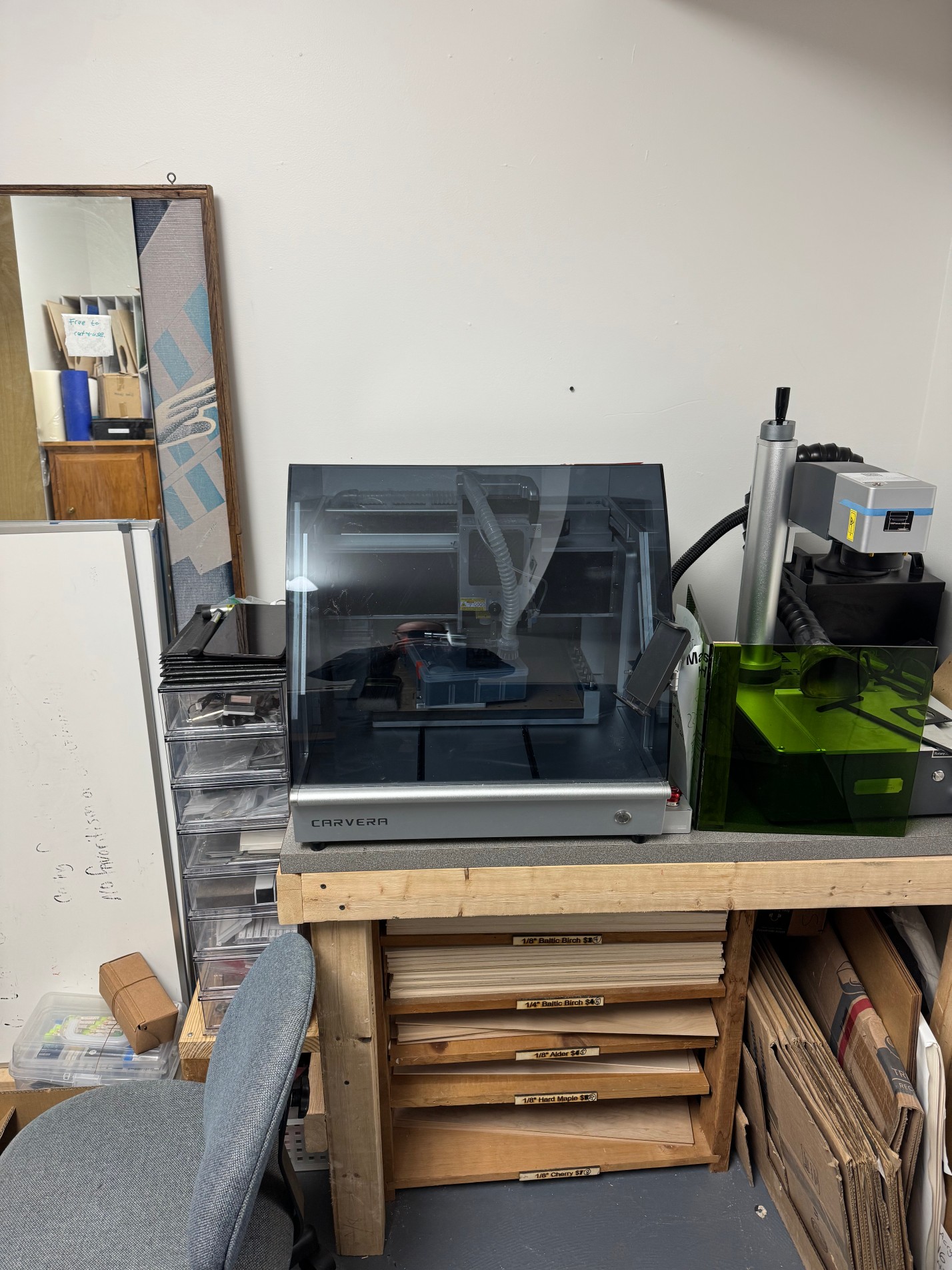
¶ Equipment Info
| Machine Type | 3-axis desktop CNC milling machine (4th axis optional) |
| Work Area | 360 × 240 × 140 mm (14.2" × 9.4" × 5.5") |
| Spindle Speed | 0 – 15,000 RPM (closed-loop brushless motor) |
| Motion System | Linear rails + ball screws on all axes |
| Tool Changer | 6-position automatic tool changer (ATC) |
| Probing | Wireless touch probe — auto tool-length measurement and workpiece probing |
| Dust Collection | Integrated internal vacuum/dust collection system |
| Connectivity | Wi-Fi (browser-based controller) or USB |
| Software | Makera CAM (recommended), Carvera Controller; also supports standard G-code from Fusion 360, FlatCAM, etc. |
| Noise Level | ~65 dB (fully enclosed) |
| Collet Sizes | ER11 collet — accepts 1/8" (3.175 mm) and other standard shank sizes |
¶ Key Features
- Automatic Tool Changer (ATC) — holds up to 6 tools in the carousel; the machine selects the right tool for each operation automatically, no manual swaps needed during a job
- Auto Probe & Leveling — the wireless touch probe measures stock height, sets Z-zero, and performs surface leveling before each job
- Closed-loop spindle and servo motors — if the machine encounters a crash or unexpected resistance, motors stop immediately to protect the tool and workpiece
- Fully enclosed frame — contains chips, reduces noise to ~65 dB, and improves safety by keeping hands away from the cutting zone
- Integrated dust collection — internal vacuum system; connect an external shop vac to the rear port for best results
¶ Safety
CNC milling is significantly more hazardous than 3D printing. Spinning end mills at up to 15,000 RPM will cut skin, break tools violently, and eject sharp chips and debris. Always follow every rule below — there are no exceptions.
¶ Required PPE
- Safety glasses or goggles (ANSI Z87.1 rated) — mandatory any time the machine is running or the enclosure is open
- The enclosure provides significant protection, but chips can escape when the door is open during setup
- Hearing protection recommended for extended sessions — the machine runs at ~65 dB, but louder during aggressive cuts in hard materials
- No loose clothing, loose hair, jewelry, or gloves near any rotating tool — these can be caught and pulled into the spindle
- Exception: thin nitrile gloves are acceptable when handling sharp metal chips after a job — never during machine operation
- Dust mask or respirator (N95 minimum) when machining MDF, wood composites, carbon fiber, or FR4 PCB material — these produce fine harmful dust even with dust collection running
¶ Emergency Stop
⚠ The physical E-Stop button is located on [TODO: confirm location on your unit — typically front face]. Hit it immediately if anything looks wrong — unexpected movement, strange noise, smoke, sparks, or tool breakage.
- You can also pause/stop the job from the Carvera Controller software interface
- After an E-Stop: do not resume until you have identified and resolved the cause. Contact [TODO: CNC lead / Hardik] before restarting after any crash or unexpected stop
¶ Enclosure Rules
⚠ Keep the enclosure door closed and latched while the spindle is running. The door interlock will pause the machine if opened, but do not rely on this as your primary safety measure.
- Never reach inside the enclosure while the spindle is spinning — always wait for it to come to a complete stop
- Do not modify, defeat, or bypass any safety interlock or enclosure panel
- Inspect workpiece fixturing before starting any job — a loose workpiece can be ejected violently at spindle speeds
¶ Fire Safety
- Do not machine magnesium or other pyrophoric metals — the fine chips can ignite spontaneously
- Do not use cutting fluid or coolant unless explicitly approved — the enclosed environment requires careful management of flammable liquids
- Fire extinguisher is located at [TODO: location near CNC]
- Do not leave the machine completely unattended during a job, especially with a new material or toolpath
¶ Approved Materials
The Carvera can machine a wide range of materials within its spindle and structural limits. All materials must be pre-approved for use at this space. When in doubt, check with [TODO: CNC lead] before starting.
| Material | Notes |
| Hardwoods & softwoods | Walnut, oak, maple, pine, etc. — excellent results. Always run dust collection. |
| MDF / plywood | Very common, easy to machine. MDF dust is hazardous — N95 required, dust collection mandatory. |
| Acrylic (PMMA) | Clean cuts with the right feeds/speeds. Use sharp single-flute bits to avoid melting. |
| Polycarbonate (PC) | Machines well; tends to produce stringy chips. |
| HDPE / ABS / POM (Delrin) | Good machinable plastics; Delrin is ideal for precision parts. |
| Aluminum (6061, 5052) | Ideal soft metal for the Carvera. Use appropriate aluminum-specific end mills and conservative depths of cut. |
| Brass / copper | Compatible; softer than aluminum, machines cleanly. |
| FR4 / PCB material | Supported — Carvera is well-suited for PCB milling. FR4 dust is a glass fiber hazard — N95 required. |
| Carbon fiber (CFRP) | Produces extremely fine carcinogenic dust — N95 mandatory, dust collection mandatory. Confirm with lead before use. |
| Wax / tooling foam | Easy test material; good for validating toolpaths before cutting real stock. |
¶ Prohibited Materials
⚠ Magnesium — pyrophoric metal; fine chips can self-ignite. Prohibited.
⚠ Steel / stainless steel — beyond the Carvera's spindle power and structural rigidity for anything beyond very light engraving. Do not attempt without lead sign-off.
⚠ Beryllium copper — highly toxic dust. Prohibited.
⚠ Any material that produces toxic fumes when cut (e.g., Teflon/PTFE at high heat) — check with lead first.
¶ Operating Procedure
¶ Before You Start — Design & CAM
- Create or obtain your design file (STL, DXF, or SVG for 2.5D; STL/STEP for 3D)
- Import into Makera CAM or your preferred CAM software and set up toolpaths
- Select the correct tool from the ATC carousel — confirm tool number matches what is physically loaded
- Set conservative feeds and speeds, especially for new materials — start slow and increase if results are good
- Set correct stock dimensions and zero point (typically top-left corner or center of stock)
- Review the 3D toolpath simulation in software before sending to the machine — verify no air cuts or crashes
- Export G-code and load via Wi-Fi or USB
¶ Machine Setup
- Put on safety glasses before opening the enclosure
- Power on the machine and connect via Wi-Fi in a browser, or open Carvera Controller on a computer
- Home the machine from the controller (Machine → Home All Axes)
- Load or confirm tools are correctly seated in the ATC carousel — check that each tool is secure and the correct bit is in the correct slot number as referenced in your G-code
- Secure your workpiece to the bed using clamps, the included side clamps, or double-sided tape — fixturing must be solid; test by hand before running
- Run the Auto Probe: the wireless probe measures tool lengths and stock surface height automatically — do not skip this step
- Set your work coordinate zero (WCS) either via probe or manually in the controller
- Close and latch the enclosure door
- Start the job from the controller — watch the first few moves closely to confirm the toolpath is executing as expected
¶ During the Job
- Stay within arm's reach for the first full operation and any tool change — confirm the ATC executes correctly
- Monitor for unusual sounds: squealing = wrong feeds/speeds or dull tool; chattering = workpiece not secure or too aggressive depth of cut; loud bang = tool breakage or workholding failure — stop immediately
- Do not open the enclosure door while the spindle is running
- If anything looks wrong, hit E-Stop first and investigate second
¶ After the Job
- Wait for the spindle to come to a complete stop before opening the enclosure
- Vacuum out chips from inside the enclosure and from the T-slot bed
- Remove and store your workpiece and any fixturing
- Inspect tools in the ATC carousel for wear or damage — dull or chipped end mills must be flagged or replaced
- Wipe down the bed and rails with a clean dry cloth — do not use liquids unless approved
- Log your session on [TODO: sign-in sheet / channel]
- Return any borrowed tools or stock material to their designated locations
¶ Tooling
¶ ATC Carousel
The Carvera's 6-position ATC carousel holds tools with ER11 collets. Shank size must be compatible with the collets available at the space.
- Standard shank: 1/8" (3.175 mm) — most common desktop CNC bits
- The tool carousel positions are numbered 1–6 — your G-code must reference the correct tool number
- Tools stored in the space: [TODO — list what end mills, drill bits, v-bits, etc. are on hand and their carousel assignments]
¶ Common Tool Types
| Tool Type | Use Case |
| Flat end mill (2-flute) | General milling, pockets, profiles in wood and plastic |
| Flat end mill (single-flute) | Best for acrylic and soft plastics — prevents melting |
| Ball nose end mill | 3D contour work, scalloped finishes, curved surfaces |
| V-bit | Engraving text and decorative patterns; PCB isolation routing |
| Drill bit | Spot drilling, through-holes; works with ATC |
| PCB engraving bit | Precision PCB isolation cuts — very fragile, use low feed rates |
| Surfacing bit (fly cutter) | Facing/flattening stock to a consistent height |
¶ Tool Care Rules
- Never use a dull or chipped tool — it produces poor results and increases the risk of breakage or workpiece ejection
- Do not swap tools in or out of the ATC carousel mid-job without understanding how this affects G-code tool calls
- Handle end mills by the shank, never the flutes — even brief skin contact can contaminate the collet grip
- Report broken or damaged tools to [TODO: CNC lead] — do not discard without logging it
¶ Maintenance
¶ Member Responsibilities (After Every Session)
- Vacuum chips and dust from the enclosure interior, bed, T-slots, and ATC carousel area
- Wipe the linear rails and ball screw areas with a dry cloth — do not apply oil unless instructed
- Inspect the work surface for stuck chips or leftover tape — remove before the next user
- Check that all tools are properly seated in the ATC carousel
- Log any issues or tool wear on [TODO: sign-in sheet / channel]
¶ Lead-Only Maintenance
- Lubrication of linear rails and ball screws — use manufacturer-specified grease only; do not substitute
- Spindle runout inspection and cleaning
- Collet and ATC carousel servicing
- Belt or coupling inspection
- Firmware and software updates
- Any issue requiring opening the rear panel or electronics enclosure
¶ Troubleshooting
| Issue | What To Do |
| Tool breakage during job | E-Stop immediately. Remove broken fragments carefully (wait for spindle to stop). Inspect workpiece fixturing. Check feeds/speeds in CAM — likely too aggressive. Report to lead before resuming. |
| Workpiece shifting or ejecting | E-Stop. This is a fixturing failure — do not continue until workholding is improved. Clamps or tape were insufficient for the cutting forces. |
| ATC fails to pick up a tool | Stop job. Verify tool is seated correctly in carousel slot. Check for chips in the collet area. Run homing sequence again. |
| Probe not triggering / bad Z height | Check probe battery. Confirm probe is in range. Re-run probing from controller before starting the job. |
| Poor surface finish / chatter | Reduce feed rate and depth of cut. Check workpiece fixturing. Check tool for wear. Ensure correct tool type for material. |
| Burning smell or smoke | E-Stop immediately. Open enclosure only after spindle stops. Likely material buildup on tool or wrong speeds for material. Ventilate area. |
| Machine won't connect over Wi-Fi | Refresh browser or restart Carvera Controller. Check that machine is powered on and on same network. Try USB cable as fallback. |
| Spindle stall / closed-loop fault | E-Stop. The closed-loop system stopped the motor due to unexpected load. Likely a crash or too aggressive cut. Report to lead. |
¶ Access Requirements
- In-person training with Hardik is required before solo use
- Training covers: machine overview, CAM basics in Makera CAM, workholding, probing, ATC operation, E-Stop use, chip cleanup, and safe material handling
- CNC is a higher-risk machine than our 3D printers — do not attempt to use it based on YouTube tutorials alone
- Training sign-off is recorded at [TODO: location or link]
¶ Members With Access
- Hardik Patel — space-wide lead
- TODO — CNC lead (confirm who holds this role)
- TODO — additional trained members
¶ Reference Material
- Makera Carvera product page & official wiki: https://www.makera.com/products/carvera
- Makera official wiki (setup, operation, tutorials): https://wiki.makera.com
- Makera CAM software download: https://www.makera.com/pages/software
- Makera YouTube channel (video tutorials): https://www.youtube.com/c/Makera
- Makerables — project sharing platform: https://makerables.makera.com
- Carvera community forum: https://community.makera.com
- Fusion 360 post-processor for Carvera: [TODO — confirm if installed/available]
- Space tool inventory (what end mills are available): [TODO]
- Feed & speed reference for common materials: [TODO — link or binder near machine]
Last updated: [TODO] · CNC lead: [TODO] · Questions? Contact the CNC lead or Hardik